

Mimer MCP Server is an essential tool for developers, data engineers, and database administrators looking to enhance their AI applications with secure database connectivity, while maintaining the advantages offered by a Database Management System (DBMS). It seamlessly integrates Mimer SQL with AI applications through the Model Context Protocol (MCP), enabling natural language database interactions without sacrificing security or requiring deep SQL expertise from end users.
In this article, we provide an overview of Mimer MCP Server as well as examples of its practical applications. For more comprehensive understanding, please refer to the documentation included in the repository.
Introduction
Mimer MCP Server is a software package that connects AI applications to Mimer SQL databases through the Model Context Protocol (MCP). The Model Context Protocol is an open standard that enables AI applications to securely connect and interact with external tools and data sources, extending their capabilities beyond training data.
Mimer MCP Server provides:
- Natural language database querying through validated tools.
- Read-only access enforcement at the server level with parameterized query support for SQL injection prevention.
- Tools for AI agents to discover schemas, tables, and stored procedures.
- Connection pool management for efficient resource utilization.
Traditional approaches require AI to generate raw SQL, often resulting in syntax errors, incorrect logic, or security vulnerabilities. Mimer MCP Server addresses these issues by exposing a controlled set of tools with built-in guardrails.
The Mimer MCP Server is compatible with Mimer SQL 11.0, or later, and is designed for developers building AI applications, data engineers integrating databases with LLM workflows, and database administrators seeking secure, controlled AI access to their databases.
Requirements and Prerequisites
The following components are necessary to start using Mimer MCP Server:
- Python 3.10 (or later) with uv Package Manager, or Docker.
- Mimer SQL 11.0 (or later) – A running Mimer SQL database instance with access credentials.
- MCP-compatible AI application – Such as VS Code with GitHub Copilot, Claude Desktop, Cursor, your own AI application that’s complied with MCP protocol.
Software Components
Mimer MCP Server is a solution that consists of several integrated components to enable AI-database interactions. This section provides a description of the main components and how they work together.
Model Context Protocol (MCP)
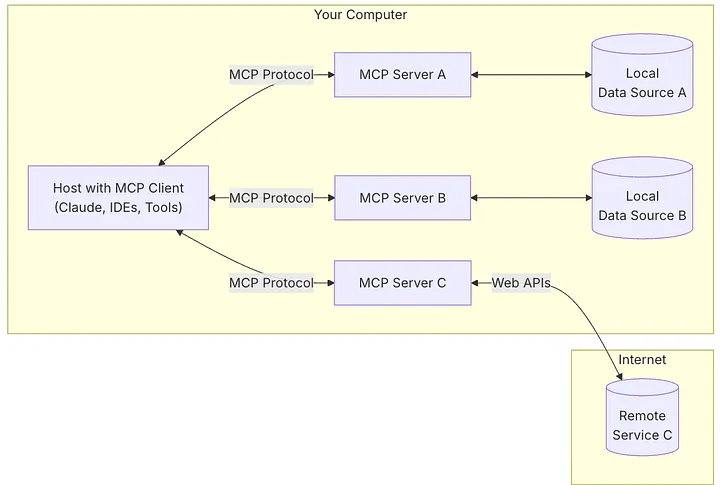
The Model Context Protocol serves as the foundation for communication between AI applications and external data sources. MCP defines a standardized way for AI hosts (like VS Code or Claude Desktop) to connect to MCP servers and access their capabilities through a client connection.
The MCP architecture consists of three key participants:
- MCP Host: The AI application that coordinates and manages MCP clients (e.g., VS Code, Claude Desktop, Cursor).
- MCP Client: A component that maintains a connection to an MCP server and obtains context from it for the MCP host to use.
- MCP Server: A program that provides context to MCP clients and exposes specific capabilities—like the Mimer MCP Server.
The following is an image from the MCP official web site, describing the architecture:
Mimer SQL Database
Mimer SQL 11.0 (or later), is providing a high-performance, standards-compliant relational database engine. Mimer MCP Server acts as an intermediary between AI applications and the Mimer SQL database, translating natural language requests into safe database operations.
For information on how to use Mimer SQL, please see the Mimer SQL Documentation Set located at the Mimer SQL Documentation site.
Mimer MCP Server Tools
The server exposes a curated set of tools that AI agents can discover and use autonomously. These tools are organized into three categories, as described in the following sections.
Database Schema Tools
Tools that allow AI agents to explore and understand the database structure:
- list_schemas – Retrieves all available schemas in the connected database.
- list_table_names – Lists all tables within a specified schema.
- get_table_info – Provides detailed schema information and sample rows for specified tables.
Query Execution Tools
Tools for safe data retrieval:
- execute_query – Executes read-only SQL SELECT queries with parameterization support to prevent SQL injection attacks.
Stored Procedure Tools
Tools that enable AI agents to discover and utilize existing business logic:
- list_stored_procedures – Lists all read-only stored procedures available in the database.
- get_stored_procedure_definition – Retrieves the DDL definition of a specific stored procedure.
- get_stored_procedure_parameters – Returns parameter information for a stored procedure.
- execute_stored_procedure – Executes a stored procedure with JSON-formatted parameters.
Connection Pool Management
The Mimer MCP Server manages database connections efficiently through a connection pool that is initialized when the server starts and maintained throughout its lifetime. Each tool automatically:
- Acquires a connection from the pool when invoked
- Executes the database operation using the acquired connection
- Returns the connection back to the pool after completion
This ensures optimal resource utilization and prevents connection exhaustion.
Architectural Overview
The diagram below shows how AI applications interact with Mimer SQL through the Mimer MCP Server. The MCP host (such as VS Code with GitHub Copilot) connects to the Mimer MCP Server through an MCP client, which then communicates with your Mimer SQL database using standard database protocols.
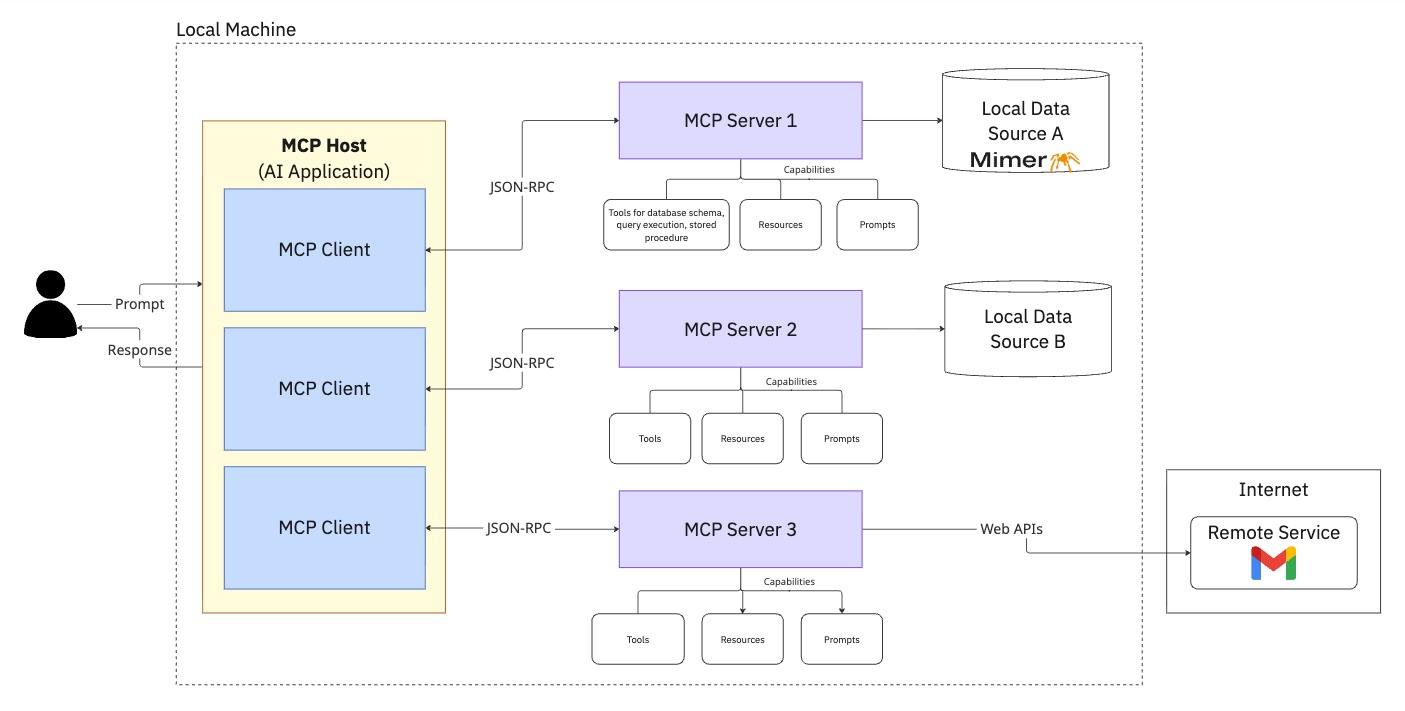
The diagram describes the landscape of MCP clients (like VS Code, Claude, Cursor) connecting to the Mimer MCP Server, which interfaces with Mimer SQL databases.
The architecture provides clear separation of concerns:
- AI Layer: Natural language understanding and tool selection.
- MCP Layer: Standardized protocol for tool discovery and invocation.
- Database Layer: Secure, validated database operations.
This separation ensures that security policies are enforced at the server level, database credentials are centrally managed, and AI agents cannot perform destructive operations.
Using Mimer MCP Server
In this section, we will explore practical examples of setting up and using Mimer MCP Server. These examples should help to get started once the installation is complete. The Github repository for Mimer MCP Server is available at https://github.com/mimersql/mimer-mcp.
Configuration
Before running the server, you need to configure your database connection settings using environment variables. The Mimer MCP Server reads these from a .env file for local development or through Docker environment variables for containerized deployments.
Creating Your Configuration File
An example configuration file is provided in .env.example. Copy it to create your own configuration:
cp .env.example .env
Then edit the .env file with your database credentials:
# Required: Database connection credentials
DB_DSN=your_database_name
DB_USER=your_username
DB_PASSWORD=your_password
# Optional: Connection settings (defaults shown)
DB_HOST=localhost
DB_PORT=1360
DB_PROTOCOL=tcp
# Optional: Connection pool settings
DB_POOL_INITIAL_CON=0
DB_POOL_MAX_UNUSED=0
DB_POOL_MAX_CON=0
DB_POOL_BLOCK=false
DB_POOL_DEEP_HEALTH_CHECK=true
# Optional: Logging level
MCP_LOG_LEVEL=INFO
The configuration supports control over connection pooling behavior:
- DB_POOL_INITIAL_CON: Number of idle connections created at startup.
- DB_POOL_MAX_UNUSED: Maximum idle connections maintained in the pool.
- DB_POOL_MAX_CON: Maximum total connections (0 = unlimited).
- DB_POOL_BLOCK: Whether to wait for available connections or raise an error when the pool is exhausted.
- DB_POOL_DEEP_HEALTH_CHECK: Validates connection health before use (recommended for production).
Getting Started with VS Code
MCP servers are configured using a JSON file mcp.json. Different MCP hosts may have slightly different configuration formats. In the following example, we will focus on VS Code as en example. First, ensure you have installed the latest version of VS Code and have access to Copilot.
In VS Code, the configuration file is located at vscode/mcp.json in your workspace. You have two options for running the server; using Docker for an isolated environment, or using Python with the uv package manager.
Option 1: Docker (Recommended)
Docker provides an isolated environment and simplifies deployment across different systems.
Option 1.1: Build the Docker Image Locally
```
docker build -t mimer-mcp-server .
```
This creates a Docker image named mimer-mcp-server that contains everything needed to run the server.
Next, create a file named mcp.json in the .vscode folder of your workspace with this configuration:
{
    "servers": {
        "mimer-mcp-server": {
            "command": "docker",
            "args": [
                "run",
                "-i",
                "--rm",
                "--add-host=host.docker.internal:host-gateway",
                "--env-file=/absolute/path/to/src/mimer_mcp_server/.env",
                "mimer-mcp-server",
            ]
        }
    },
    "inputs": []
}
The –add-host flag allows the Docker container to connect to a Mimer SQL database running on your host machine. Replace absolute/path/to/.env with the actual absolute path to your environment configuration file on your host machine. If your Mimer SQL database is running on the host machine, ensure your .env file uses host.docker.internal as the DB_HOST value (instead of localhost).
Option 1.2: Use the pre-built image from Docker Hub
Mimer provides a pre-built image on Docker Hub that you can use without building locally. Docker will automatically pull the image when you first run the container.
Create a file named mcp.json in the .vscode folder of your workspace with this configuration: { “servers”: { “mimer-mcp-server”: { “command”: “docker”, “args”: [ “run”, “-i”, “–rm”, “–add-host=host.docker.internal:host-gateway”, “–env-file=/absolute/path/to/.env”, “mimersql/mimer-mcp:latest”, ] } }, “inputs”: [] }
The –add-host flag allows the Docker container to connect to a Mimer SQL database running on your host machine. Replace absolute/path/to/.env with the actual absolute path to your environment configuration file on your host machine. If your Mimer SQL database is running on the host machine, ensure your .env file uses host.docker.internal as the DB_HOST value (instead of localhost).
Option 2: Python with uv
First, ensure you have uv installed. Then, create a file named mcp.json in the .vscode folder of your workspace with this configuration:
{
    "servers": {
        "mimer-mcp-server": {
            "type": "stdio",
            "command": "uvx",
            "args": [
                "mimer_mcp_server"
            ]
            ,
            "env": {
                "DOTENV_PATH": "/absolute/path/to/.env"
            }
        }
    },
    "inputs": []
}
Replace absolute/path/to/.env with the actual absolute path to your environment configuration file.
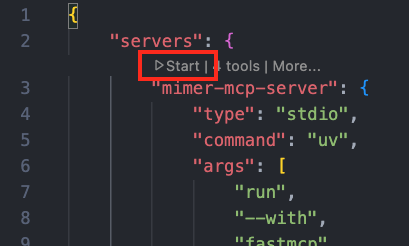
After saving the configuration file, VS Code will display a Start button in the mcp.json file. Click it to launch the server.
Once your server is running, you can access its tools through Copilot:
- Open Copilot Chat in VS Code.
- In the Copilot Chat box, select Agent mode from the dropdown menu:
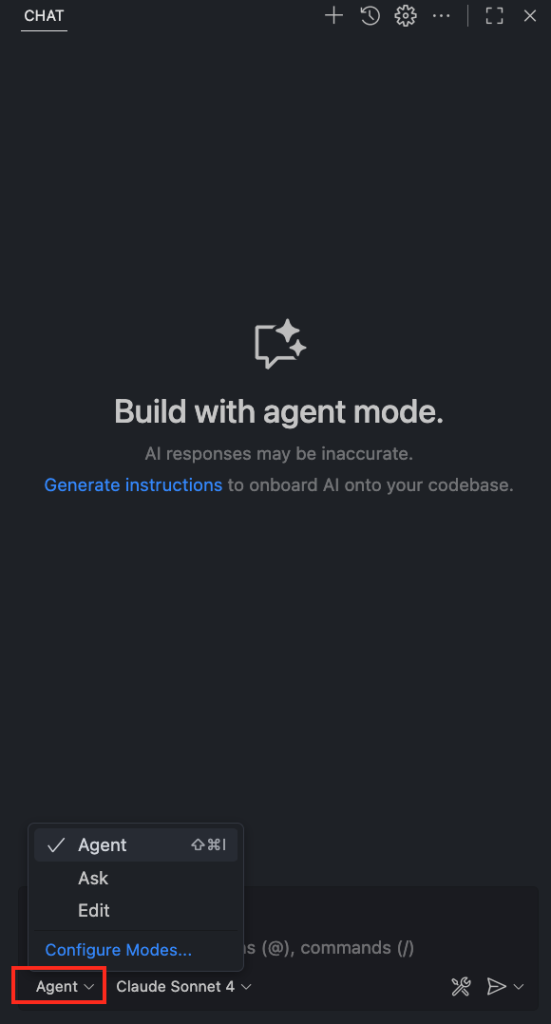
- Click the Tools button to view all available tools and ensure the tools from Mimer MCP Server are selected. We recommend adding “use mimer-mcp-server tools” in your prompt to ensure that tools from Mimer MCP Server are utilized. More examples of how to use Mimer MCP Server through natural language queries can be found at our Github repository:
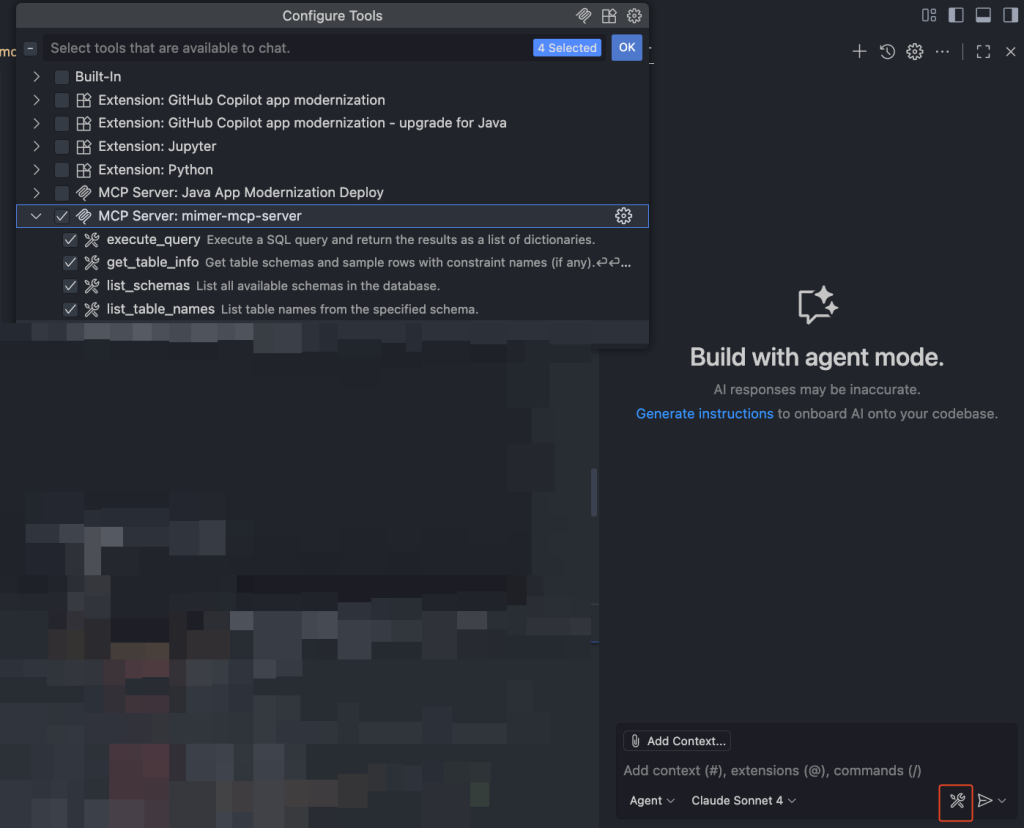
You’re now ready to interact with your Mimer SQL database through natural language queries in Copilot!
Using with AI Agents
Once your server is running and connected to an AI application, end users can interact with the database using natural language—no SQL knowledge required.
Example: Natural Language Database Query
An end user might ask:
“What products do we have in stock?”
The AI agent will:
- Use list_schemas to discover available schemas.
- Use list_table_names to find relevant tables.
- Use get_table_info to understand the table structure.
- Use execute_query to retrieve the data.
- Present the results in a human-readable format.
Example: Leveraging Stored Procedures
Using the Mimer SQL example database (based on a music and book store), an end user might ask:
“Use stored procedures to find book titles that sound like ‘harie potta'”
The AI agent will:
- Use list_stored_procedures to discover available procedures.
- Use get_stored_procedure_parameters to understand the required inputs for mimer_store_book.search.
- Use get_stored_procedure_definition to understand what the procedure does.
- Use execute_stored_procedure to call the procedure with appropriate parameters.
- Return matching results like “Harry Potter and the Philosopher’s Stone”.
This approach allows the AI to leverage existing business logic embedded in stored procedures, such as fuzzy matching algorithms, rather than attempting to recreate that logic through generated SQL.
Example: Schema Discovery
A developer might ask:
“What tables exist in the MIMER_STORE schema?”
The AI agent will use list_table_names with the schema parameter and return a formatted list of all available tables, helping developers quickly understand the database structure.
Real-World Application Scenarios
Business Analytics
Business users can query databases using natural language without requiring a data analyst to write SQL queries. For example:
- “Show me sales trends for the last quarter“
- “Which customers have placed orders over $1000?“
- “What are our top-selling products?“
The AI agent handles schema discovery, query generation, and result presentation automatically.
Business Intelligence Integration
Database administrators can expose specific stored procedures to AI applications, allowing them to:
- Run pre-approved analytical queries.
- Access computed metrics and KPIs.
- Maintain consistent business logic across applications.
The read-only nature of the MCP server ensures that AI agents cannot accidentally modify or delete data, providing peace of mind for production deployments.
Future Development
The Mimer MCP Server is actively maintained and will continue to evolve with additional tools and capabilities to further enhance AI-database interactions. We welcome feedback and contributions from the community to help shape the future of this project.
Important Links
- Mimer MCP Server GitHub Repository: https://github.com/mimersql/mimer-mcp
- Mimer SQL Documentation: https://docs.mimer.com
- Model Context Protocol Specification: https://modelcontextprotocol.io
- Mimer SQL Downloads: https://developer.mimer.com/products/downloads
- Mimer SQL Developer Resources: https://developer.mimer.com
- The Mimer SQL Example Database: https://developer.mimer.com/article/the-example-database