This cookbook example will walk you through the steps to migrate the sample database MF_PERSONNEL from Oracle Rdb to Mimer SQL. This will all take place on one single IA-64 machine, i.e., Mimer SQL will be installed alongside Rdb on the same server.
There are a few requisites that need to be fulfilled on the IA-64 server before we can start:
- Mimer SQL downloaded from Mimer SQL Developer site and installed according to the instructions in the Mimer SQL OpenVMS Guide
- OpenJDK 8 for OpenVMS
- JDBC drivers for Oracle Rdb
Procedure
Step 1 Create a new Mimer SQL database
Create a directory on the disk where the database should be stored
$ CREATE /DIR SYS$SYSDEVICE:[PERSONNEL]
Edit the file SQLHOSTS and add a new local entry for the database. Go to the section “local” and add a name for the database, followed by the full path to the directory just created. In this example will the database be called “PERSONNEL” with a path “SYS$SYSDEVICE:[PERSONNEL]”, so the entry in SQLHOSTS will be:
PERSONNEL SYS$SYSDEVICE:[PERSONNEL]
Run the command SDBGEN to create an empty database:
$ SDBGEN PERSONNEL
Accept all defaults and use “SYSADM” as password for the SYSADM user.
Finally start the Mimer SQL server for this database and make it available for the current session:
$ DEFINE MIMER_DATABASE PERSONNEL
$ MIMCONTROL /START
At this stage is Mimer SQL running with a newly created, empty dabase named PERSONNEL. This can be verified by logging into the database:
$ bsql

Mimer SQL Command Line Utility Version 11.0.9F
Copyright (C) Mimer Information Technology AB. All rights reserved.

Username: SYSADM
Password:

SQL>exit;
$
Step 2 Prepare for migration
To install the Mimer SQL Rdb migration package, go to Mimer SQL Rdb migration on GitHub, click the green button marked “<> Code”, and select “Download Zip”. Transfer the resulting zip file to the OpenVMS system and unpack.
Once done, do the following to set up the Java classpath for the Mimer SQL data copy program:
$ DEFINE JAVA$CLASSPATH MIMER$LIB:MIMJDBC3.JAR, RDB$JDBC_HOME:RDBNATIVEV8.JAR, SYS$DISK:[]MIMERJCOPY.JAR
The last thing needed is to pick a username for a user in the Mimer SQL database, a user who will be the owner of the schema and the migrated data. This username is later passed, together with a selected password, to the migration scripts which will create this user during the migration process.
In this example will this user will be called MIGRATEUSER with the password MIGRATEPASSWD
Step 3 Configure JDBC
For the purposes of this cookbook, only two items are needed for the JDBC configuration:
- Data source
- Data target
This configuration is provided to the Mimer SQL Rdb Migration Toolkit by editing the following properties in the the file jdbc.properties:
- source.url – the JDBC URL for where Rdb’s MF_PERSONNEL is stored
- target.url – in this example, jdbc:mimer://localhost:1360/personnel
Step 4 Migrate the schema from Rdb
The source schema is migrated using the DCL command file UNLOAD_RDB.COM. This command file takes two parameters: the Rdb database schema to export, and the name of the corresponding target schema in Mimer SQL.
In this example, the source database is MF_PERSONNEL and the target schema is PERSON, resulting in the following unload command:
$ @UNLOAD_RDB <path to MF_PERSONNEL> PERSON
Step 5 Migrate data from Rdb into Mimer SQL
The entire migration is handled by a single DCL command file, LOAD_MIMER.COM, which takes four parameters:
- the SYSADM password, defined during database creation in step 1 (set to “SYSADM”)
- the target schema (“PERSON”)
- the Mimer SQL username for the schema owner (“MIGRATEUSER”)
- the corresponding Mimer SQL password (“MIGRATEPASSWD”)
During the migration, the script creates the specified Mimer SQL user, assigns ownership of the target schema, creates the schema itself, and then loads the data from Rdb into Mimer SQL.
The resulting command is therefore:
$ @LOAD_MIMER SYSADM PERSON MIGRATEUSER MIGRATEPASSWD
Step 6 Verification
Enter the Mimer SQL command line utility, BSQL, and login as MIGRATEUSER.
$ bsql

Mimer SQL Command Line Utility Version 11.0.9F
Copyright (C) Mimer Information Technology AB. All rights reserved.

Username: MIGRATEUSER
Password:

SQL>select * from person.colleges;
COLLEGE_CODE COLLEGE_NAME              CITY                 STATE POSTAL_CODE
============ ========================= ==================== ===== ===========
AU           American University       Washington           DC    20016
BATE         Bates College             Lewiston             ME    04240
BOWD         Bowdoin College           Brunswick            ME    04011
CALT         Cal. Institute of Tech.   Pasadena             CA    91125
COLB         Colby College             Waterville           ME    04901
DREW         Drew University           Madison              NJ    07940
FLU          University of Florida     Gainesville          FL    32601
HVDU         Harvard University        Cambridge            MA    02138
MIT          Mass. Institute of Tech.  Cambridge            MA    02139
PRDU         Purdue University         West Lafayette       IN    47907
QUIN         Quinnipiac College        Hamden               CT    06518
STAN         Stanford University       Stanford             CA    94305
UME          University of Maine       Orono                ME    04473
USCA         U. of Southern California Los Angeles          CA    92037
YALE         Yale University           New Haven            CT    06520

15 rows found

SQL>exit;
$
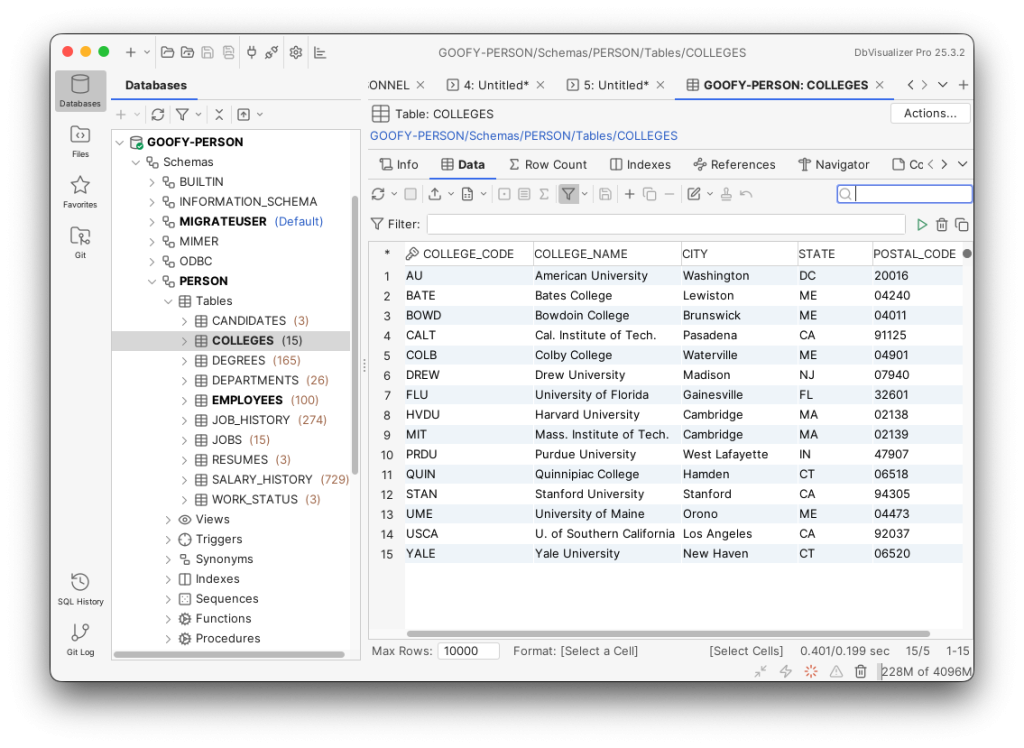
It is also possible to access the Mimer SQL database remotely. The image below shows the same table as above, accessed from a macOS computer using JDBC and the DbVisualizer application.