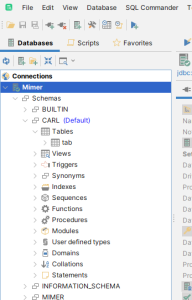
There are several ways to list all tables in a Mimer SQL database. It is worth mentioning that in a Mimer SQL context, all tables means all tables to which the user has access to. To have access to a table, the owner of the table must have given at least SELECT access to the current user.
Using BSQL
One of the most straight forward ways is to use the LIST TABLES command of the command line BSQL tool.
SQL>create table tab (c1 integer);
SQL>list tables;
TABLE_SCHEMA
TABLE_NAME
================================================================================================================================
CARL
tab
===
SYSTEM
MANYROWS
===
SYSTEM
ONEROW
===


SQL>
As can be seen in this example, aside from the table TAB owner by the current user CARL, the user also has SELECT access to the two system tables SYSTEM.MANYROWS and SYSTEM.ONEROW.
Querying the INFORMATION_SCHEMA views
The SQL standard INFORMATION_SCHEMA views contain meta data on objects in the system so they can be queried. The list of tables can be accessed through the view INFORMATION_SCHEMA.TABLES.
SQL>select * from INFORMATION_SCHEMA.TABLES where TABLE_TYPE='BASE TABLE';
TABLE_CATALOG
TABLE_SCHEMA
TABLE_NAME
TABLE_TYPE           COMMIT_ACTION        TABLE_FORMAT
================================================================================================================================

CARL
tab
BASE TABLE           -                    VARIABLE
===

SYSTEM
MANYROWS
BASE TABLE           -                    VARIABLE
===

SYSTEM
ONEROW
BASE TABLE           -                    VARIABLE
===

                  3 rows found

SQL>
Querying the INFORMATION_SCHEMA.TABLES view is the SQL standard way of listing tables in a database.
Using the table view of the DBVisualizer tool
The graphical interface shipped with Mimer SQL, DBVisualizer, is able to show a table list in one of its panes.
For example: