

Node.js has become one of the most widely used platforms for building web applications, APIs, and microservices. With its asynchronous, event-driven architecture and the vast npm (Node Package Manager) ecosystem, it is a natural choice for modern server-side development.
We are pleased to announce the release of @mimersql/node-mimer, an official Node.js driver for Mimer SQL. The driver provides direct bindings to the Mimer SQL C API, giving JavaScript developers a straightforward, Promise-based interface to Mimer SQL — no ODBC layer required.
What is @mimersql/node-mimer?
@mimersql/node-mimer uses a C++ native addon to communicate with Mimer SQL through the Mimer SQL C API. Pre-built binaries are included for supported platforms (Linux, macOS, and Windows), so there is no need for a C++ compiler at install time. If you have Node.js and the Mimer SQL client runtime installed, you are ready to go.
Key features include:
- Promise-based API with async/await support
- Parameterized queries with ? placeholders (SQL injection safe)
- Prepared statements for repeated execution
- Transaction support (commit/rollback)
- Cursor support for streaming large result sets
- Connection pooling with automatic acquire/release
- Full data type support including BLOB, NCLOB, UUID, and all standard SQL types
- Structured error objects with Mimer error codes
- TypeScript type definitions included
Getting Started
Prerequisites
To use @mimersql/node-mimer, you need:
- Node.js 18.0 or later
- Mimer SQL 11.0 or later installed on your system
The Mimer SQL client runtime provides the shared library (libmimerapi) that the driver links against. On Linux this is libmimerapi.so, on macOS it is libmimerapi.dylib, and on Windows it is mimapi64.dll.
Installation
npm install @mimersql/node-mimer
That’s it. Prebuilt binaries are included for supported platforms (Linux x64/arm64, macOS x64/arm64, Windows x64), so no C++ compiler is needed. On other platforms, the addon is compiled from source automatically.
A Simple Example
Here is a complete example that connects to a Mimer SQL database, creates a table, inserts some data, and queries it back:
const { connect } = require(‘@mimersql/node-mimer’);
async function main() {
const client = await connect({
dsn: ‘mydb’,
user: ‘MYUSER’,
password: ‘secret’
});
// Create a table
await client.query(`
CREATE TABLE employees (
id INTEGER PRIMARY KEY,
name NVARCHAR(100) NOT NULL,
department NVARCHAR(50),
salary DECIMAL(10,2)
)
`);
// Insert rows using parameterized queries
await client.query(
‘INSERT INTO employees VALUES (?, ?, ?, ?)’,
[1, ‘Alice’, ‘Engineering’, 95000]
);
await client.query(
‘INSERT INTO employees VALUES (?, ?, ?, ?)’,
[2, ‘Bob’, ‘Marketing’, 72000]
);
await client.query(
‘INSERT INTO employees VALUES (?, ?, ?, ?)’,
[3, ‘Carol’, ‘Engineering’, 105000]
);
// Query with a parameter
const result = await client.query(
‘SELECT name, salary FROM employees WHERE department = ?’,
[‘Engineering’]
);
console.log(‘Engineers:’);
for (const row of result.rows) {
console.log(` ${row.name}: $${row.salary}`);
}
// Clean up
await client.query(‘DROP TABLE employees’);
await client.close();
}
main();
Running this program produces:
Engineers: Alice: $95000 Carol: $105000
Prepared Statements
When you need to execute the same query multiple times with different parameters, prepared statements avoid repeated parsing and optimization on the server:
const { connect } = require(‘@mimersql/node-mimer’);
async function main() {
const client = await connect({
dsn: ‘mydb’,
user: ‘MYUSER’,
password: ‘secret’
});
await client.query(`
CREATE TABLE sensors (
id INTEGER PRIMARY KEY,
location NVARCHAR(50),
reading DOUBLE PRECISION
)
`);
// Prepare once
const stmt = await client.prepare(
‘INSERT INTO sensors VALUES (?, ?, ?)’
);
// Execute many times
const readings = [
[1, ‘North Wing’, 22.5],
[2, ‘South Wing’, 23.1],
[3, ‘Server Room’, 18.7],
[4, ‘Lobby’, 21.0],
];
await client.beginTransaction();
for (const reading of readings) {
await stmt.execute(reading);
}
await client.commit();
await stmt.close();
// Verify
const result = await client.query(‘SELECT * FROM sensors ORDER BY id’);
console.log(`Inserted ${result.rowCount} sensor readings`);
await client.query(‘DROP TABLE sensors’);
await client.close();
}
main();
Streaming Large Result Sets
For queries that return many rows, loading everything into memory at once may not be practical. The cursor API lets you process rows one at a time using the standard JavaScript async iterator protocol:
const cursor = await client.queryCursor(
‘SELECT * FROM large_table WHERE category = ?’,
[‘active’]
);
for await (const row of cursor) {
processRow(row);
}
The cursor fetches rows from the server incrementally, keeping memory usage constant regardless of the total result set size. If you break out of the loop early, the cursor is cleaned up automatically.
Connection Pooling
For applications that handle concurrent requests, such as web servers, creating a new database connection for each request is expensive. The built-in connection pool manages a set of reusable connections:
const { createPool } = require(‘@mimersql/node-mimer’);
const pool = createPool({
dsn: ‘mydb’,
user: ‘MYUSER’,
password: ‘secret’,
max: 10
});
// Connections are acquired and released automatically
const result = await pool.query(‘SELECT * FROM products WHERE id = ?’, [42]);
// For transactions, check out a dedicated connection
const client = await pool.connect();
await client.beginTransaction();
await client.query(‘UPDATE accounts SET balance = balance – ? WHERE id = ?’, [100, 1]);
await client.query(‘UPDATE accounts SET balance = balance + ? WHERE id = ?’, [100, 2]);
await client.commit();
client.release();
// Shut down the pool when the application exits
await pool.end();
How It Works
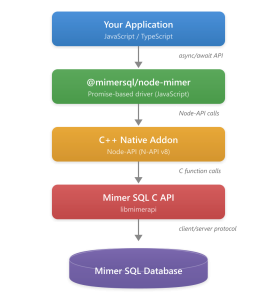
The driver architecture is straightforward:
Architecture diagram
The driver includes a C++ native addon that calls the Mimer SQL C API functions directly using Node-API (N-API v8). This is the same C API used by Mimer’s official ODBC, JDBC, and ADO.NET drivers. Since the addon uses Node-API, the pre-built binaries are stable across Node.js versions — no recompilation is needed when you upgrade Node.js.
Why Use @mimersql/node-mimer?
- Direct API access.
The driver calls the Mimer SQL C API directly, without going through ODBC or any other intermediate layer. This gives you access to Mimer SQL features with minimal overhead. - Easy installation.
Pre-built binaries are included for all major platforms, so installation is a single npm install command with no compiler required. The native addon uses Node-API for ABI stability across Node.js versions. - Familiar API.
If you have used database drivers like pg (PostgreSQL) or mysql2 in Node.js, the API will feel familiar: connect, query, prepare, transactions, pooling — all with Promises and async/await. - Full Unicode support.
The driver uses the UTF-8 variant of the Mimer SQL C API throughout, ensuring that Unicode text round-trips correctly between JavaScript and the database. - TypeScript ready.
Type definitions are included in the package, so you get autocomplete and type checking out of the box.
Resources
- npm package: https://www.npmjs.com/package/@mimersql/node-mimer
- GitHub repository: https://github.com/mimersql/node-mimer
- Mimer SQL documentation: https://developer.mimer.com/documentation
- Mimer SQL C API reference: https://developer.mimer.com/mimerapi
- Node-API documentation: https://nodejs.org/api/n-api.html
- Node.js: https://nodejs.org