

DBeaver, one of the most widely used open-source database tools, now includes native support for Mimer SQL. Starting with DBeaver 26.2.4, Mimer SQL has its own dedicated plugin, developed by Mimer Information Technology and contributed upstream to the DBeaver project. Previously, connecting to Mimer SQL from DBeaver meant going through DBeaver’s generic JDBC driver, which only ever showed the handful of objects every database has in common. The new plugin handles all the different kinds of Mimer SQL objects.
A connection to Mimer SQL now shows its real object model. Each schema lists its tables, views, procedures, functions, modules, sequences, domains, collations and synonyms, with a flat, schema-wide index listing and a dedicated node for user-defined types alongside statements and triggers. At the server level, a DBA Views folder covers users, groups, programs, databanks and shadows, and — ahead of the upcoming Mimer SQL 11.1 — external CLR libraries. There’s also a Server Info folder, showing the server’s driver details, data types and supported SQL standards.

Everything Mimer SQL exposes, organized the way it actually works — not
flattened down to the generic JDBC view.
Most of this is more than just browsing. You can create and drop schemas, tables, sequences, domains, users, groups, databanks and more directly from the navigator, manage object, column and system privileges, and edit procedures, functions, triggers, modules and statements in place. Object and column comments and dependency tracking (“Used By” / “Uses”) are wired up too.
This is not limited to tables and schemas — the server’s own administrative objects work the same way too. The DBA Views folder covers users, groups, programs, databanks and shadows — create a user, grant it group membership, and add one or more OS-level login authorizations, all from the navigator, no SQL required.
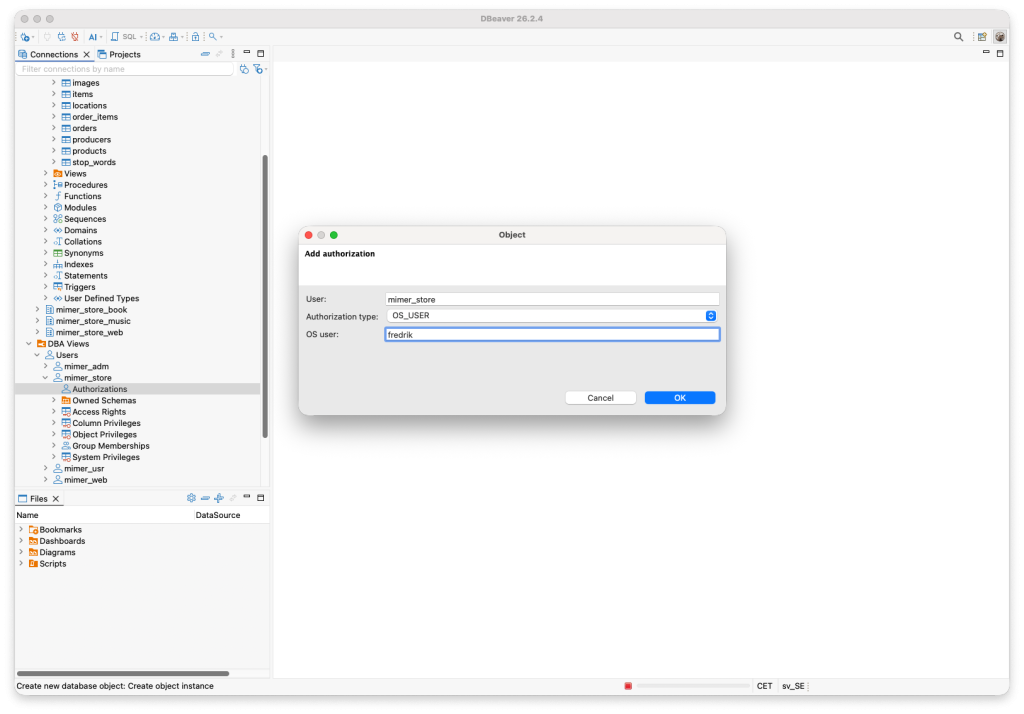
Creating, editing and authorizing users, groups, programs and databanks
is all native.
Index creation gets the same treatment. Beyond ordinary unique and multi-column indexes, Mimer SQL supports per-column search algorithms such as word search and PinYin — and, ahead of the upcoming Mimer SQL 11.1, clustered indexes, Ignore Nulls, and INCLUDE columns, which carry extra data along with an index without making it part of the key, so a query can be answered straight from the index without a separate table lookup. DBeaver’s Create Index dialog exposes all of it directly.
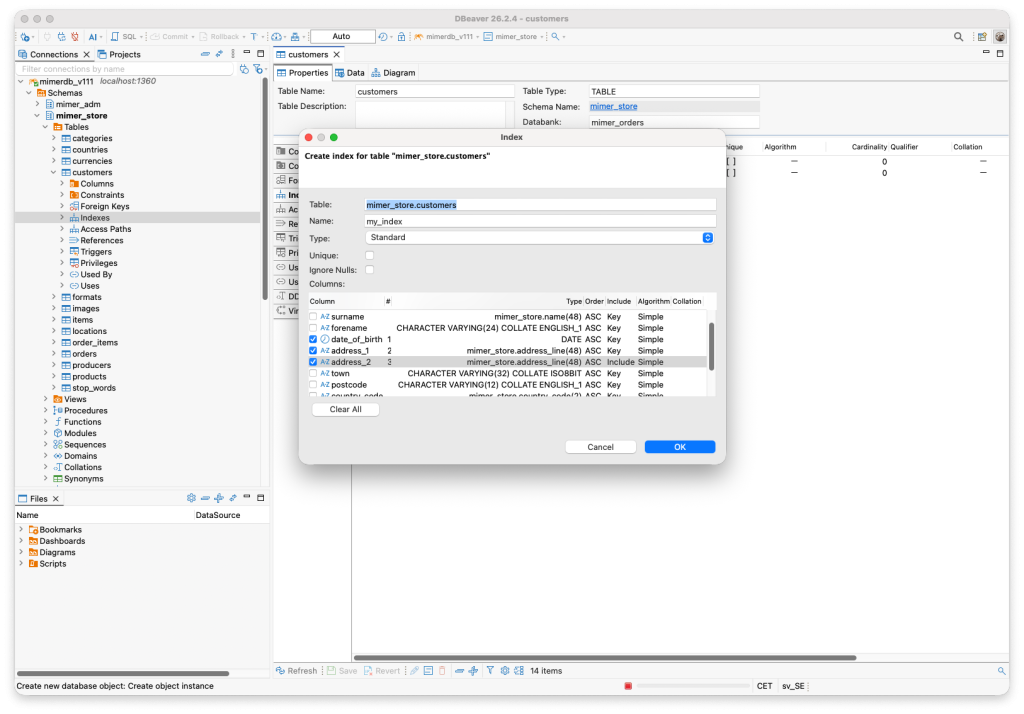
Two key columns and one Include column, assembled without writing a line of DDL by hand.
One detail that’s easy to miss from a plain object list, but genuinely distinctive about Mimer SQL, is the Access Path. In Mimer SQL, access paths are the optimizer’s alternative routes to a table’s rows: real indexes, the primary key, and qualifying foreign keys. DBeaver’s new Mimer SQL plugin surfaces this directly: every table gets its own Access Paths folder, sitting alongside the more familiar Constraints and Indexes, so you can see exactly what the optimizer has available — every real index, the primary key, and any foreign key that qualifies on its own, each one expandable down to its individual columns.

Three related but distinct views onto the same table — the constraints as declared, the indexes as created, and the full set of access paths the optimizer actually has to work with, here with cst_postcode expanded to show its columns.
Mimer SQL’s geographic column types get the same native treatment. A GIS_LOCATION column renders straight on DBeaver’s built-in map viewer — pick a row and see exactly where it is, no separate GIS tool required.

Ten rows of New York landmarks, each just a click away from its point on the map.
If you’re already using DBeaver with Mimer SQL through the old generic driver, your existing connections migrate automatically the first time you open them after upgrading. If you haven’t tried DBeaver with Mimer SQL before, this is a good time to start — download DBeaver from dbeaver.io and connect to your Mimer SQL server.